
“Which of our Meta ads are actually working? And don’t show me the ROAS column.”
So you’ve got Ads Manager open. You sort by purchases. Then by ROAS. Then by cost per purchase on a 7-day click window, because somebody said view-through is inflated.
Every sort tells a different story. And all of them are Meta’s story.
So you want a Meta creative dashboard that reaches the order. That means Facebook ads creative reporting built on your own data, where every ad connects to the post people actually saw, the session it started, and the order that came after.
Can Ads Manager do that? Can a CSV export do that?
No. But your warehouse can, if one ID runs all the way through.
What should a Meta creative dashboard answer?
A Meta creative dashboard should answer two questions. Which creative ideas earn attention? And which ones reach orders in my own data?
That’s it. Two questions.
A standard Facebook ads reporting dashboard answers a third question nobody asked: “What did Meta credit itself with this week?”
If you need the bigger picture first (what creative performance analytics is, and where correlation stops), start there. This page is the build. Table by table.
The point is to get one ID from the ad to the order, and keep it.
What tables do you need for Facebook ads creative reporting?
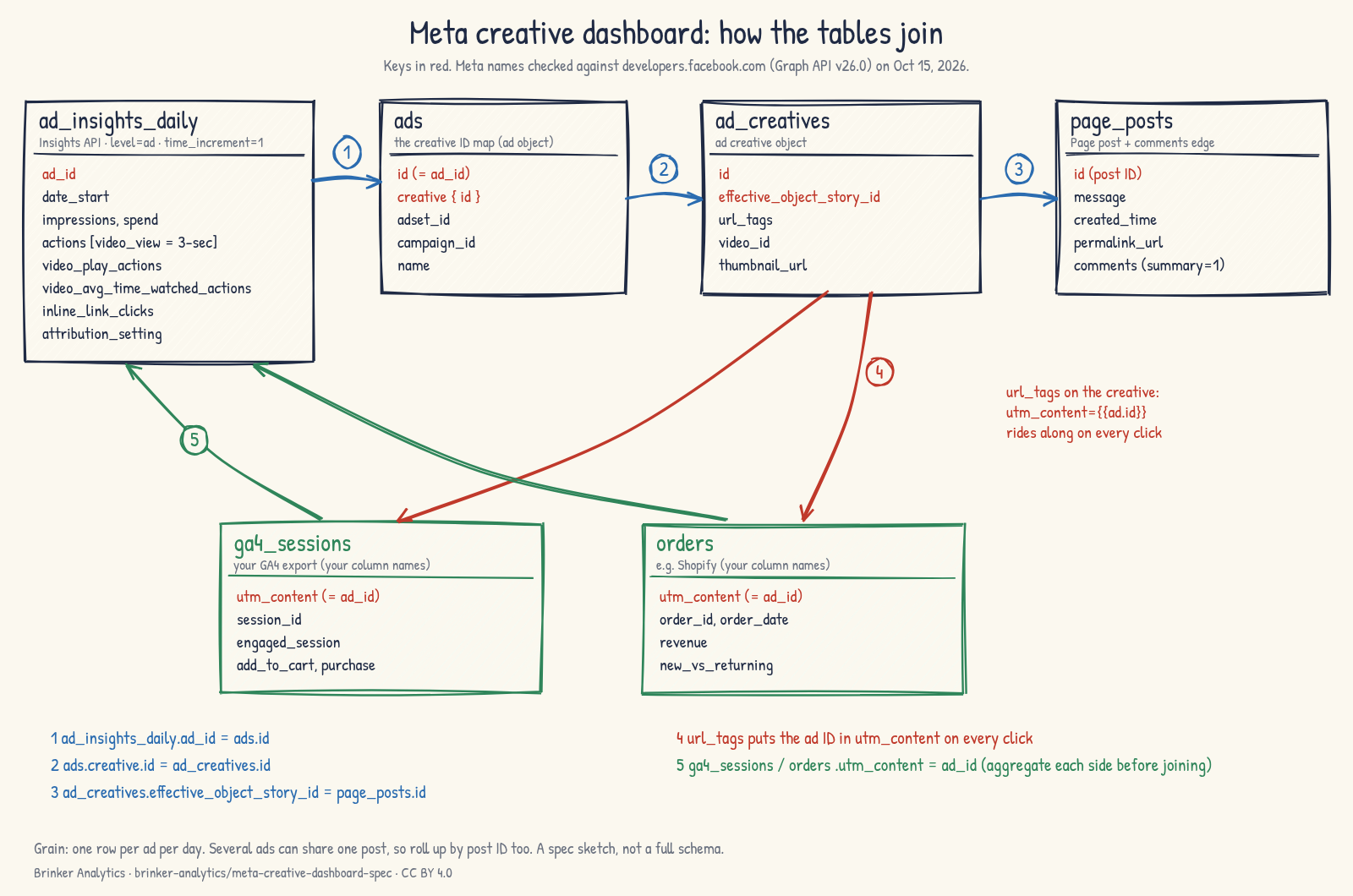
You need four Meta tables (daily ad insights, ads, ad creatives, and Page posts with their comments) plus two first-party tables: GA4 sessions and orders. The ad ID connects them.
| Table | Where it comes from | Grain | Key |
|---|---|---|---|
ad_insights_daily | Marketing API Insights, level=ad, time_increment=1 | ad × day | ad_id + date_start |
ads | the ad object: id, name, creative, adset_id, campaign_id | ad (snapshot it daily) | id |
ad_creatives | the ad creative object | creative | id |
page_posts + post_comments | Graph API Page post, plus its comments edge | post; comment | post id |
ga4_sessions | your GA4 export (BigQuery or similar) | session | utm_content = ad ID |
orders | your order system (e.g. Shopify), with landing-site or UTM fields | order | utm_content = ad ID |
Store every Meta ID as a string. They’re long, and a spreadsheet will happily round them for you (it doesn’t help).
Step 1: Which Meta Insights fields do you pull?
Call the ad Insights edge with level=ad and time_increment=1 for one row per ad per day. Pull delivery, spend, the actions list, and the video fields. Save the attribution setting on every row.
Your ETL is probably landing some of this already. Check that it includes:
- Delivery and cost:
impressions,spend,cpm,inline_link_clicks,inline_link_click_ctr. - Conversions:
actions,action_values,purchase_roas. Pick ONE purchase action type (for exampleomni_purchase) and stick with it. - Video:
video_play_actions,video_avg_time_watched_actions,video_30_sec_watched_actions,video_p25_watched_actionsthroughvideo_p100_watched_actions, and the 3-second views, which arrive insideactionsas thevideo_viewaction type. - The window:
attribution_setting, plus whatever you passed inaction_attribution_windows(Meta’s default is7d_clickand1d_view).
Land it in your warehouse, BigQuery or otherwise. And re-pull the trailing 28 days on every run. Meta says Insights “do not change after 28 days of being reported,” which means they CAN change before that.
Step 2: How do you join each Meta ad to its Facebook post?
Read the ad’s creative{id}, then read that creative’s effective_object_story_id. That’s the Page post ID, whether the post was organic or created with the ad. Join it to the post’s id.
Why not object_story_id? Because Meta says it’s null when the post was created along with the ad. The effective_ version is filled in either way.
So the chain is:
ads.creative.id→ad_creatives.idad_creatives.effective_object_story_id→page_posts.id- From the post, pull
message,created_time,permalink_url,full_picture, theattachmentsedge, and thecommentsedge (summary=1gives atotal_count).
Here’s the join in SQL (column names from the repo’s schemas/):
-- ad -> creative -> post, one row per ad per day
SELECT i.date_start, i.ad_id, c.effective_object_story_id AS post_id,
       p.message, p.permalink_url, p.full_picture,
       i.impressions, i.spend
FROM ad_insights_daily i
JOIN ads a          ON a.ad_id = i.ad_id AND a.snapshot_date = i.date_start
JOIN ad_creatives c ON c.creative_id = a.creative_id
LEFT JOIN page_posts p ON p.post_id = c.effective_object_story_id;
Now your dashboard can show the post itself: the copy, the thumbnail, a link to the live post. That gives a media buyer enough context to jump in.
Do several ads share one post?
Often, yes. One post, many ads, one pile of comments and social proof. So roll up by post ID as well as ad ID. Otherwise the same comments get counted three times.
What about comment text?
You can use it, for themes. Just strip names and handles before anything is stored, have an LLM tag the themes, and keep the raw text out of the dashboard. Counts and themes are what the media buyer needs.
Step 3: Which Facebook UTM parameters put the ad ID in every click?
Put utm_content={{ad.id}} in each ad’s URL parameters, which the API stores as the creative’s url_tags. Meta fills in the real ad ID at click time. GA4 and your order system then carry an ID you can join on.
Here’s the template I’d start with:
utm_source=facebook&utm_medium=paid_social&utm_campaign={{campaign.id}}&utm_content={{ad.id}}The source, medium and campaign values are your call. The non-negotiable part is {{ad.id}} in a stable parameter.
Meta also offers name tokens ({{ad.name}}, {{campaign.name}}). Skip them for joins. Names get edited, retyped and duplicated. IDs don’t.
Can you fix tags on a running ad?
Not on the same creative. Meta’s API won’t update url_tags on an existing creative (the update call takes only the name, status, account and labels). A fix means a new creative. So snapshot your ads table daily, keep the ad-to-creative history, and audit coverage:
- Find every active ad.
- Check whether its creative’s
url_tagscontains{{ad.id}}. - Report the share of spend on ads that don’t.
That last number is your blind spot. Know it before you trust anything downstream!
Step 4: How do you join Meta ads to GA4 sessions and Shopify orders?
In GA4, read the session’s utm_content (the ad ID) and count engaged sessions, add-to-carts and purchases per ad. In your orders, parse utm_content from the landing-site URL or UTM fields, then count orders, revenue and new customers per ad.
Two tables, same key!
GA4: In the export, the campaign content value on the session is your ad ID. Group by it and you get sessions per ad that came from your own analytics, not Meta’s. If you haven’t set up the export yet, GA4 to BigQuery for marketing measurement covers what to decide first.
Orders: Many order systems keep the landing URL or UTM fields on the order (Shopify, for example). Parse utm_content out of it. Now you have first-party orders, revenue and new-versus-returning, per ad.
And they won’t match GA4 exactly. That’s normal. Why GA4 and Shopify revenue disagree walks through what to check.
Aggregate each side before you join. If you join raw orders straight onto daily ad rows, every extra order duplicates that day’s impressions and spend. Sum orders per ad (and day), sum insights per ad (and day), THEN join.
Step 5: How does Meta’s credit compare with your first-party orders?
Put three numbers side by side for each ad and each post: Meta’s purchases (on a stated window), GA4 purchases on the ad ID, and first-party orders carrying the ad ID. Show the ratio. Don’t crown a winner.
Picture this: Meta credits an ad with more purchases than your orders show for that ad ID. No problem. That’s expected. Meta counts view-through, cross-device and its own modeling. Your order table counts only orders that kept the tag.
Example (synthetic numbers, not a real brand): Ad A shows 120 Meta purchases on 7-day click plus 1-day view. My order table has 70 orders carrying Ad A’s ID. That’s a Meta-to-first-party ratio of about 1.7.
Ad B shows 40 Meta purchases and 38 tagged orders. Ratio about 1.05.
Here’s the comparison, with each side summed BEFORE the join so nothing double-counts:
WITH meta AS (
  SELECT ad_id, attribution_setting, SUM(meta_purchases) AS meta_purchases
  FROM ad_insights_daily GROUP BY ad_id, attribution_setting
), fp AS (
  SELECT utm_content AS ad_id, COUNT(DISTINCT order_id) AS tagged_orders
  FROM orders WHERE utm_content IS NOT NULL GROUP BY utm_content
)
SELECT m.ad_id, m.attribution_setting, m.meta_purchases, f.tagged_orders,
       m.meta_purchases / NULLIF(f.tagged_orders, 0) AS meta_to_first_party
FROM meta m LEFT JOIN fp f ON f.ad_id = m.ad_id;
So which ad is better? You can’t tell from the ratio alone. But you CAN see that Ad A leans on credit your own records can’t see. That’s a question worth asking. Maybe it’s an upper-funnel video doing its job without a click. Maybe it’s view-through on people who were going to buy anyway.
The gap is the finding. Why your Meta, Google, GA4, Shopify and finance numbers disagree explains where it comes from. Attribution models explained covers the windows.
What would I compare in a Facebook ads data analysis, and why?
Keep the standard Meta columns for context. Then rank creative on rates per impression: seconds viewed per impression, thumbstop rate, hook rate, CTA strength, and first-party orders per 1,000 impressions. A per-impression rate keeps heavy-spend ads from winning on volume.
Once the rates are in, here’s how I read them for patterns, and where AI fits.
What are the standard columns for?
Context. Spend, impressions, CPM, link CTR, cost per purchase and Meta ROAS tell you how the ad was delivered and what Meta credited. They’re the “where are we” columns.
Which custom metrics do I use?
| Metric | Formula (Meta field names) | Use it to |
|---|---|---|
| Seconds viewed per impression | total seconds watched ÷ impressions (formula below) | read attention without CPMs in it |
| Thumbstop rate | 3-second views (actions, video_view) ÷ impressions | see whether the opening stops the scroll |
| Hook rate | video_completed_view_or_15s_passed_actions ÷ 3-second views | see whether the people who stopped kept watching (see the caveat below) |
| CTA strength | link clicks (inline_link_clicks) ÷ 3-second views | see whether viewers act; once GA4 is joined, swap in sessions |
| First-party orders per 1,000 impressions | tagged orders ÷ impressions × 1,000 | reach the order on your own record |
| Meta-to-first-party ratio | Meta purchases ÷ tagged orders | spot ads leaning on credit you can’t see |
| Comments per 1,000 impressions | post comments total_count ÷ impressions × 1,000 (by post) | gauge conversation, then read the themes |
| Days since post created | today − post created_time | watch for fatigue |
Why seconds viewed per impression instead of CPV?
“It normalizes the engagement action. CPV is heavily a function of CPMs and bidding as well as engagement.” (Eric Brinker)
And CPC has the same problem. When a cost metric moves, you can’t tell how much of that is people watching and how much is the auction.
How do you calculate seconds viewed per impression?
Meta defines video_avg_time_watched_actions as “The average time a video was played, including any time spent replaying the video for a single impression.” (Meta, Ad Insights reference)
Read that carefully. “For a single impression” tells you replays inside one impression count. It does NOT make the field a per-impression number. It’s an average per play. An impression with no play isn’t in it.
So:
seconds viewed per impression
  = SUM(video_avg_time_watched_actions × video_play_actions) ÷ SUM(impressions)
Or think of it as two parts: (seconds per play) × (plays per impression).
Example (synthetic numbers): Ad A has 40,000 impressions, 18,000 plays and a 6.0-second average. That’s 108,000 seconds, or 2.7 seconds per impression. Ad B has 40,000 impressions, 30,000 plays and a 4.0-second average. That’s 120,000 seconds, or 3.0 seconds per impression.
Ad A wins on average play time. Ad B wins on time per impression, because more people started watching.
Three mistakes to avoid:
- Don’t label
video_avg_time_watched_actionsas “per impression.” It’s per play. - Don’t divide the average by impressions. It’s already been divided once (that’s the double divide).
- Don’t average daily averages. Rebuild total seconds per row, then sum the numerator and the denominator separately.
What does each video metric mean in Meta’s API?
Thumbstop is the 3-second view, which arrives in actions as video_view (“3-Second Video Views”). For the hook rate’s 15-second count, I use video_completed_view_or_15s_passed_actions. One caveat, plainly: Meta’s reference lists that field but doesn’t define it. Going by its name, it counts views that reached 15 seconds OR finished the video, so a video shorter than 15 seconds can score a “15-second view” just by being watched to the end. Compare hook rates within similar video lengths. And Meta notes that inline_link_clicks uses a fixed 1-day-click attribution window.
Do these metrics predict sales?
Not on their own. They’re not guarantees of success. Test whether, and how, each one moves with your own results before you lean on it.
And one caution on clicks. Some marketers report that in-app website previews get counted as link clicks, which may not reflect real interest. Once GA4 is joined, use sessions instead of link clicks for CTA strength.
What can’t a Meta creative dashboard tell you?
It can’t tell you an ad caused a sale. It shows which creative patterns move with attention and orders in your records. Windows, modeling, missing tags and privacy gaps all shape those numbers. Use it to pick what to test.
What shapes the numbers?
- Attribution windows. Meta’s results depend on the window. Store the setting on every row, and never mix windows in one trend. View-through credit has no first-party counterpart.
- Restatement. Insights can change for up to 28 days. Re-pull a trailing window.
- Reach. Meta no longer returns reach for standard queries that use breakdowns with start dates more than 13 months back. Pull reach without breakdowns, or within Meta’s async limit.
- Rate limits. Use async jobs for big pulls, and watch Meta’s throttle headers.
- Join gaps. Untagged ads, tags changed by swapping creatives, dynamic or Advantage+ ads with many assets under one ad ID, catalog ads, and posts reused across ads.
- Privacy. Comments are personal data. Drop names and handles, honor deletions, and never put personal data in a UTM. GA4 consent gaps hit some ads harder than others.
So what is it good for?
A short list of ideas worth a real test.
Pick one creative idea. Then test it with a holdout or geo test. The incrementality testing framework covers the design, and the geo-test feasibility checks tell you whether your data can support one.
Will regression or ML on creative features come later?
Maybe. That’s on the repo roadmap, after a statistician’s review. Not before.
The step plan
Eight steps, in order. Each one is a section in the repo’s docs/step-plan.md, so your AI assistant can follow along.
- Confirm the prerequisites: Meta tables are landing, and IDs are stored as strings.
- Audit URL tags: the share of spend on ads whose
url_tagscontain{{ad.id}}. - Build the ad → creative → post map.
- Pull posts, attachments and comment counts (and scrubbed comment text, if you use it).
- Build the GA4 and order tables keyed by ad ID.
- Compute the metrics.
- Build the Meta-versus-first-party comparison.
- Review weekly, and pick one idea to test.
Open an AI coding assistant. Point it at the spec on GitHub and at your warehouse. Tell it to run the steps in order, to never invent a field, and to stop and ask when data is missing. The repo’s AGENTS.md says exactly that.
If the record and the review process aren’t ready yet, start with a reporting system instead of a dashboard.
FAQs
How do I join Meta ad performance to the Facebook post?
Read the ad's creative, then the creative's effective_object_story_id. That's the Page post ID whether the post was organic or created with the ad. Meta's object_story_id is null when the post was made with the ad, so don't rely on it. Several ads can share one post, so roll up by post ID too.
How do I connect Meta ads to Shopify orders?
Add utm_content={{ad.id}} to every ad's URL parameters (the creative's url_tags in the API). Meta fills in the ad ID at click time. Then parse utm_content from the order's landing-site URL or UTM fields, and join on the ad ID. Sum orders per ad before you join them to Meta's daily rows.
Why use seconds viewed per impression instead of cost per view?
Seconds viewed per impression normalizes the engagement action. CPV is heavily a function of CPMs and bidding as well as engagement, so a cost change can be the auction, not the audience. Compute it as average play time times plays, divided by impressions. Meta's average is per play, not per impression.
Why don't Meta's purchases match my orders?
Meta counts on an attribution window (7-day click and 1-day view by default), including view-through, and it can credit purchases across devices. Your order table counts only orders that kept the ad's tag. Untagged ads and consent gaps widen the difference. Show the ratio per ad. The gap is the finding.
Does a creative dashboard prove an ad caused sales?
No. It shows which creative patterns move with attention and orders in your own records. That's correlation. To learn whether a creative caused sales, run a holdout or a geo test on the idea that matters, then let the test decide.
What should a Facebook ads reporting dashboard for creative include?
One row per ad per day from Meta's Insights API, the post each ad ran as, GA4 sessions and first-party orders joined on the ad ID, and rates per impression: seconds viewed, thumbstop, hook rate and orders per 1,000 impressions. Keep the attribution window on every row.
Meta’s documentation
- Ad Insights edge reference (fields and parameters)
- Ads action stats (action types, including
video_view) - Ad creative reference (
effective_object_story_id,url_tags) - Insights API best practices (rate limits, the 28-day window, the reach limit)
- Page post reference and comments edge
The big picture
Meta will always tell you its own story. That’s its job.
Your job is to give every ad an ID, carry it from the post to the order, and read attention per impression instead of per dollar. Then the dashboard hands you a short list of ideas worth testing.
So open the spec, point your assistant at your warehouse, and see what your data says!